Forge of Empires Store Building City: 50 Best Tips & Ultimate Guide to Maximize Your City Fast
Forge of Empires is a massively popular browser-based strategy game where players build and manage their own city through various historical ages. One of the most valuable yet often misunderstood features in the game is the store building function. This article provides a comprehensive guide to understanding, using, and optimizing store building mechanics in Forge of Empires. Whether you are a beginner or an experienced player, mastering store building can transform your gameplay strategy and city efficiency.
Table of Contents
| Section | Topic |
|---|---|
| 1 | What Is Store Building in Forge of Empires |
| 2 | Types of Store Building Items |
| 3 | How to Access the Store Building Feature |
| 4 | Benefits of Using Store Building |
| 5 | Step by Step Guide to Store Building |
| 6 | Common Mistakes to Avoid |
| 7 | Advanced Store Building Strategies |
| 8 | Store Building vs. Selling Buildings |
| 9 | Frequently Asked Questions |
| 10 | Conclusion |
What Is Store Building in Forge of Empires
Store building in Forge of Empires refers to the mechanic that allows players to temporarily remove a structure from their city grid and keep it in their inventory for later use. Unlike selling a building, which permanently removes it and provides some coins or supplies, store building preserves the building at its current level and age. This feature is particularly useful when you need to reorganize your city layout, upgrade roads, or save high value event buildings for future ages.
The store building function is not available for every structure. Most standard production buildings, military buildings, goods buildings, cultural buildings, and decorations can be stored. However, some special buildings like the Town Hall, certain Great Buildings, or event buildings that have already been upgraded past certain points may have restrictions. Understanding which buildings are eligible for storage is critical for effective city management.
Types of Store Building Items
In Forge of Empires, there are different types of store building items and mechanics. The primary method is using a Store Building item, which is a consumable inventory item. There are also renovation kits and one up kits that serve similar but distinct purposes.
Store Building Item: This is a blue colored item that allows you to store any eligible building directly into your inventory. When you use this item on a building, the building disappears from your city and appears as a stored building in your inventory. You can then place it again anytime.
Renovation Kit: This item updates a building to your current age when you place it back. It is different from a store building item because it does not store the building but rather upgrades its age.
One Up Kit: Similar to renovation kit but only increases the building by one age rather than bringing it directly to your current age.
Store building items are often obtained through events, guild expeditions, daily challenges, and special questlines. They are considered premium items because they provide flexibility that selling cannot offer.
How to Access the Store Building Feature
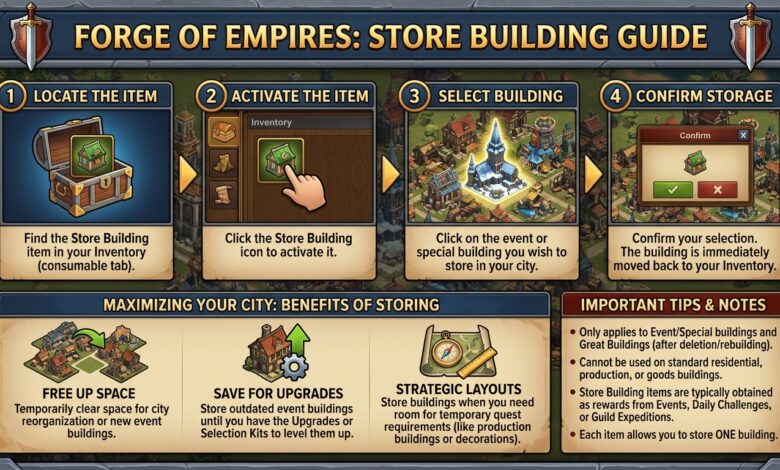
Accessing the store building feature is straightforward. First, ensure you have at least one Store Building item in your inventory. You can check your inventory by clicking the inventory icon usually located at the bottom of the game interface. Look for the blue building shaped icon with an arrow.
To store a building, follow these steps. Click on the building you wish to store. A menu will appear showing options such as move, sell, and if you have a store building item available, a store option will appear. Click the store option. The building will immediately be removed from your city grid and placed into your inventory as a stored building.
You can also access stored buildings from your inventory to place them back. Open your inventory, navigate to the stored buildings section, select the building you want to place, and click on an empty spot in your city grid. The building will appear exactly as it was when stored, with the same level and production status.
Benefits of Using Store Building
Using store building instead of selling offers numerous advantages. The most significant benefit is preservation of progress. If you have an event building that took months to upgrade to level 10, selling it would be catastrophic. Storing it allows you to keep that progress and place it again later.
Another major benefit is age flexibility. When you store a building, it retains its age. This means if you are about to advance to a new age and your current buildings become obsolete, you can store them and then use renovation kits later to bring them to the new age. This strategy saves resources and time.
Store building also enables better city planning. You may want to completely redesign your city layout to optimize road connections, boost production from certain buildings, or create space for temporary event buildings. Storing buildings temporarily gives you the freedom to experiment without permanent loss.
Space management is another key benefit. During special events, you might need temporary space for event buildings. Instead of selling permanent buildings, you can store them and bring them back after the event ends. This is far more efficient than rebuilding from scratch.
Step by Step Guide to Store Building
Step 1: Obtain Store Building Items. Participate in events, complete guild expedition encounters, finish daily challenges, or check the antiques dealer for store building items. They can also appear as rewards in questlines.
Step 2: Assess Your City Layout. Identify which buildings are causing inefficiencies. Look for buildings that are far from roads, blocking potential expansions, or no longer needed for current production goals.
Step 3: Check Building Eligibility. Before attempting to store a building, verify it can be stored. Most regular buildings can be stored. Great Buildings, the Town Hall, and some event buildings with ongoing timers may not be eligible.
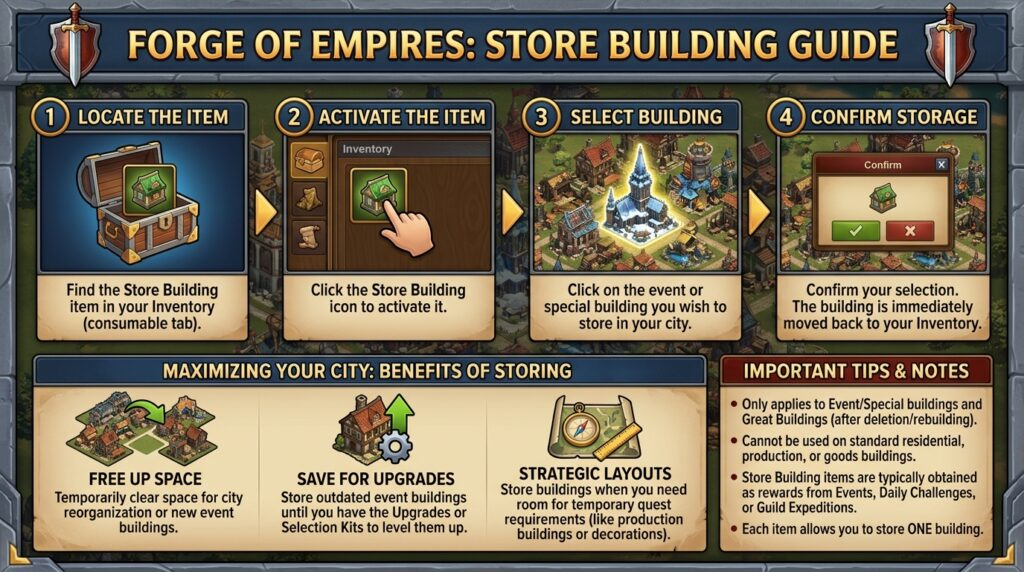
Step 4: Open the Building Menu. Click on the building you want to store. If you have a store building item, the store button will appear alongside move and sell options.
Step 5: Confirm Storage. Click the store button. A confirmation dialog may appear. Confirm your choice. The building will disappear from your city and appear in your inventory.
Step 6: Reorganize Your City. With the building removed, you now have empty space. Rearrange roads, move other buildings, or place new event buildings as needed.
Step 7: Restore Stored Buildings. When you are ready to bring back the stored building, open your inventory, go to stored buildings, select the building, and place it in an empty grid spot that has a road connection if required.
Common Mistakes to Avoid
Mistake 1: Storing Wrong Buildings. Never store buildings that are actively producing goods or supplies unless you are okay with losing that production cycle. When you store a building, any ongoing production is cancelled and not refunded.
Mistake 2: Wasting Store Building Items on Cheap Buildings. Store building items are rare and valuable. Do not use them on cheap buildings like a blacksmith or a hunter that cost almost nothing to rebuild. Save store building items for high level event buildings, limited edition buildings, or buildings that cannot be rebuilt.
Mistake 3: Forgetting Road Connections. When you restore a stored building, ensure you have a road connection if the building requires one. Placing it without a road connection will render it non functional and you will have to pay to move it again.
Mistake 4: Ignoring Age Differences. If you store a building from a previous age and then advance to a new age, that building will still be at the old age when restored. It will produce old age goods and supplies, which may be less valuable. Plan to use renovation kits after restoring.
Mistake 5: Storing Great Buildings. You cannot store Great Buildings. Attempting to do so will not work. Do not waste store building items trying to store a Great Building.
Advanced Store Building Strategies
Strategy 1: Age Hopping Preparation. Before moving to a new age, store all your valuable event buildings and special buildings. After advancing, use renovation kits on them while they are still in your inventory. Then place them back at your new age. This saves you from having to rebuild or upgrade each building individually.
Strategy 2: Event Space Management. Major events often introduce temporary production buildings that require large amounts of space. Instead of selling permanent buildings, store them for the duration of the event. After the event ends, restore your permanent buildings and store or sell the event buildings.
Strategy 3: Guild Expedition Boost Rotation. Some players keep a set of military boost buildings stored. Before participating in guild expedition or guild battlegrounds, they place these boost buildings, fight their battles, and then store them again to free up space for other activities.
Strategy 4: Store Building Item Farming. Store building items can be obtained from the antiques dealer by trading in unwanted inventory items. Some players deliberately farm antiques dealer coins to purchase store building items when available. This requires patience but yields a steady supply.
Strategy 5: Layout Optimization Cycles. Perform a full city storage and redesign once every few months. Store all eligible buildings, reorganize your road network to minimize road tiles, and then restore buildings in optimal positions. This can increase your city efficiency by reducing wasted space.
Store Building vs. Selling Buildings
Understanding when to store versus when to sell is crucial for long term success. Selling a building provides immediate coins or supplies but permanently removes the building. You lose any upgrades, levels, or limited edition status. Selling is appropriate for low value buildings that are cheap to rebuild or for buildings that have become completely obsolete and have no future use.
Store building preserves the building and all its progress. It is always the better choice for event buildings, special residential buildings, limited edition cultural buildings, and any building that took significant time or resources to obtain. The only downside is that store building consumes a store building item, which is a limited resource.
In terms of cost efficiency, store building items are worth saving for buildings that would cost diamonds or significant time to replace. A common rule among experienced players is to never sell any building that cannot be rebuilt immediately from the build menu. If the building requires blueprints, event currency, or limited time access, store it instead of selling it.
Frequently Asked Questions
Q1: Can I store a Great Building in Forge of Empires?
No, Great Buildings cannot be stored. The store building function does not work on Great Buildings. You must leave them in your city permanently once placed.
Q2: Do store building items expire?
No, store building items do not expire. They remain in your inventory indefinitely until used. You can save them for as long as you want.
Q3: Can I store a building that is currently under construction?
No, buildings under construction cannot be stored. You must wait for construction to complete before storing.
Q4: What happens to production when I store a building?
Any ongoing production is cancelled and lost. You will not receive the goods, supplies, coins, or other resources that were being produced. Always collect before storing.
Q5: Can I store a building that is motivated or polished?
Yes, but the motivation or polish effect will be lost. The building will lose its boosted production or cultural bonus when stored.
Q6: How many store building items can I have at once?
There is no known limit. You can accumulate as many store building items as you want. They stack in your inventory.
Q7: Can I store a building from a higher age than my current age?
Yes, you can store any eligible building regardless of age. However, when you restore it, it will still be at that higher age. If you are at a lower age, you may not be able to place it because buildings from higher ages sometimes require higher age roads or have placement restrictions.
Q8: Can store building items be traded or sold?
No, store building items are bound to your account and cannot be traded to other players. They can be sold to the antiques dealer but this is not recommended as they are more valuable when used.
Q9: Do renovation kits work on stored buildings?
Yes, renovation kits can be used on stored buildings directly from your inventory. This is actually the most efficient way to use renovation kits because you do not need to find space to place the building first.
Q10: Is there a limit to how many times I can store the same building?
No, you can store and restore the same building repeatedly as long as you have store building items each time you want to store it.
Conclusion
Store building in Forge of Empires is a powerful mechanic that every serious player should master. By preserving high value buildings, enabling flexible city redesigns, and facilitating age transitions, store building transforms how you manage your city. The key is to accumulate store building items through events and daily activities, use them strategically on buildings that cannot be easily replaced, and avoid common mistakes like storing production active buildings or wasting items on cheap structures.
Advanced strategies such as event space management, age hopping preparation, and boost rotation demonstrate the depth of gameplay that store building enables. Compare every storage decision against selling to ensure you are making the optimal choice for your long term progress. With practice, store building becomes an intuitive part of your city management routine.
Remember to always collect productions before storing, check building eligibility, and maintain road connections when restoring. Store building items are precious – use them wisely, and your Forge of Empires city will thrive through every age and challenge the game presents.